
Windows Defender Application Control Overview
WDAC allows organizations to control which drivers and applications are allowed to run on their Windows clients. It was designed as a security feature. WDAC policies apply to the managed computer as a whole and affects all users of the device.
WDAC and AppLocker Overview – Windows security | Microsoft Docs
WDAC rules can be defined based on:
- Attributes of the codesigning certificate(s) used to sign an app and its binaries
- Attributes of the app’s binaries that come from the signed metadata for the files, such as Original Filename and version, or the hash of the file
- The reputation of the app as determined by Microsoft’s Intelligent Security Graph
- The identity of the process that initiated the installation of the app and its binaries (managed installer)
- The path from which the app or file is launched (beginning with Windows 10 version 1903)
- The process that launched the app or binary
Organizations that have successfully deployed application control have ensured the following before starting their planning. Once these business factors are in place, you are ready to begin planning your WDAC deployment. WDAC is a powerful tool that needs planning and support, but it is built in to Windows and requires no additional installs.
- Executive sponsorship and organizational buy-in is in place.
- There is a clear business objective for using application control, such as further Zero Trust adoption, and it is not being planned as a purely technical problem from IT.
- The organization has a plan to handle potential helpdesk support requests for users who are blocked from running some apps.
- The organization has considered where application control can be most useful (for example, securing sensitive workloads or business functions) and also where it may be difficult to achieve (for example, developer workstations).
| Type of Device | How WDAC relates to this type of device |
|---|---|
| Lightly managed devices: Company-owned, but users are free to install software. Devices are required to run organization’s antivirus solution and client management tools. | WDAC can be used to help protect the kernel, and to monitor (audit) for problem applications rather than limiting the applications that can be run. |
| Fully managed devices: Allowed software is restricted by IT department. Users can request additional software, or install from a list of applications provided by IT department. Examples: locked-down, company-owned desktops and laptops. | An initial baseline WDAC policy can be established and enforced. Whenever the IT department approves additional applications, it will update the WDAC policy and (for unsigned LOB applications) the catalog. WDAC policies are supported by the HVCI service. |
| Fixed-workload devices: Perform same tasks every day. Lists of approved applications rarely change. Examples: kiosks, point-of-sale systems, call center computers. | WDAC can be deployed fully, and deployment and ongoing administration are relatively straightforward. After WDAC deployment, only approved applications can run. This is because of protections offered by WDAC. |
While WDAC policies can be created with PowerShell, the Windows Defender Application Control (WDAC) policy Wizard is an open-source Windows desktop application built to provide security architects with security, and system administrators with a more user-friendly means to create, edit, and merge WDAC policies. The Wizard uses the ConfigCI PowerShell Cmdlets in the backend so the output policy of the Wizard and PowerShell cmdlets is identical.
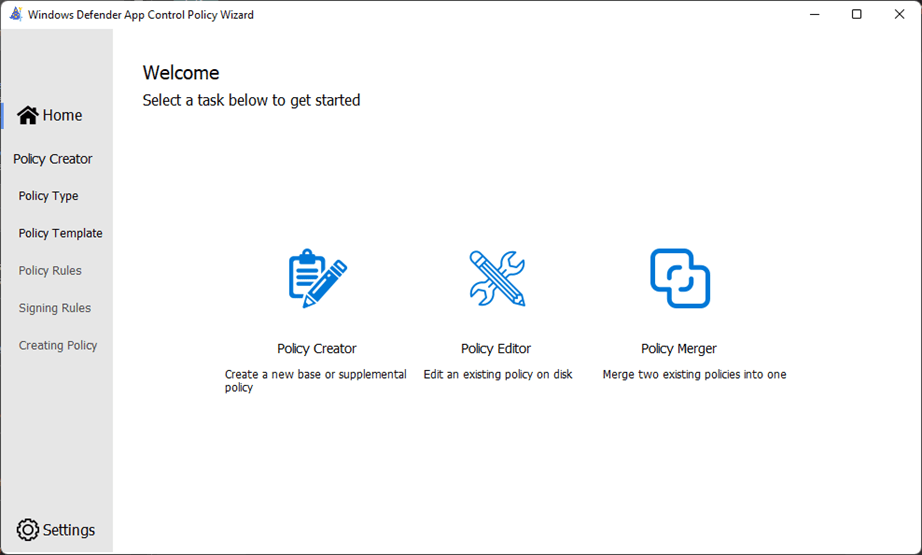
The Policy Creator task provides base templates for policy creation. Each of the template policies has a unique set of policy allow list rules that will affect the circle-of-trust and security model of the policy.
For instance, the Default Windows mode policy trusts fewer application publishers and signers than the Signed and Reputable mode policy.
The Default Windows policy will have a smaller circle-of-trust with better security than the Signed and Reputable policy, but at the expense of compatibility.
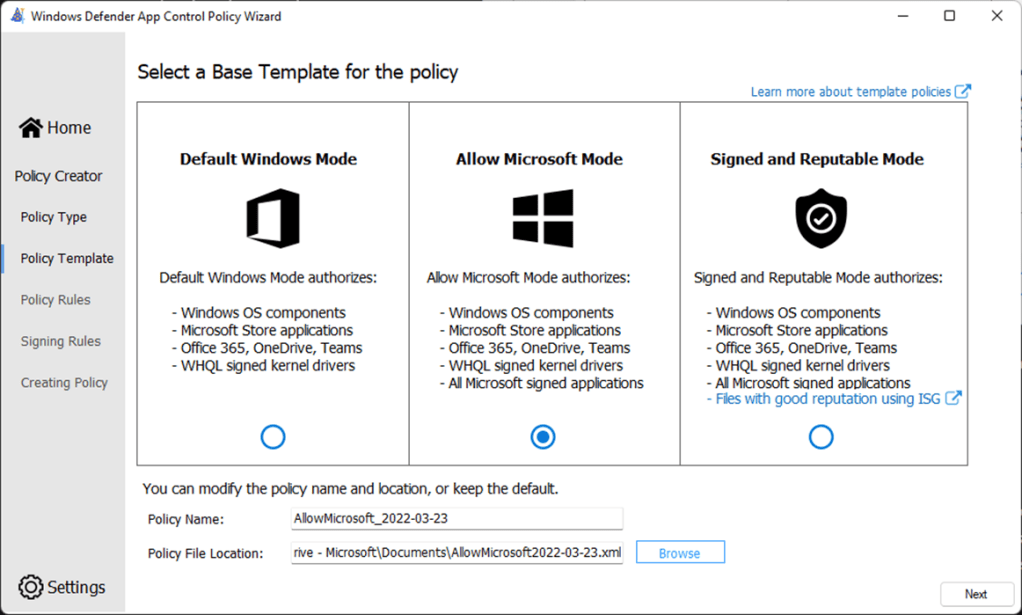
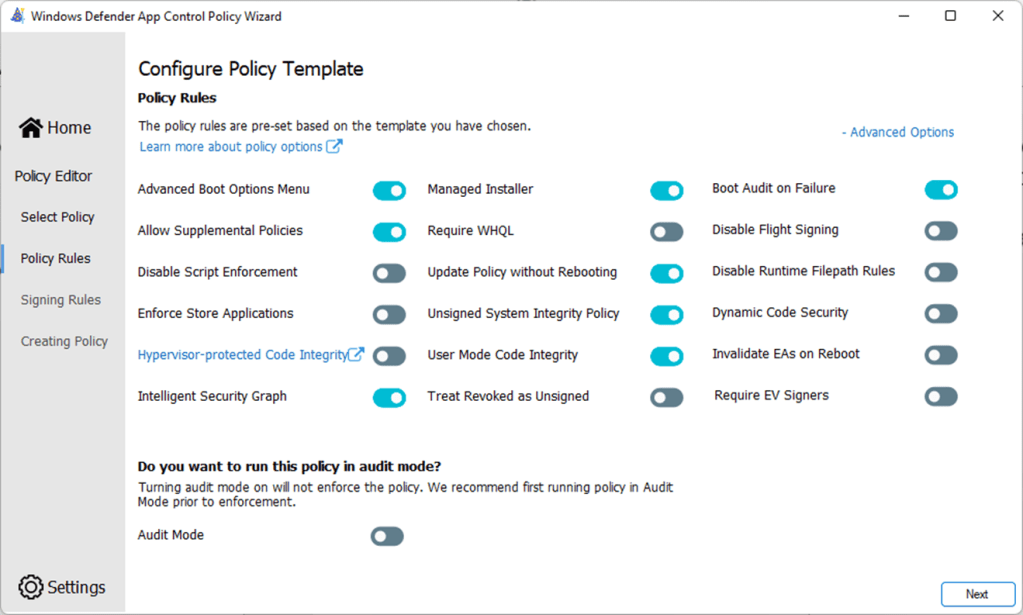
This example Allow Microsoft policy will allow apps from Microsoft, as well as apps that are know as trustworthy by an organization. All other apps are implicitly denied, including high reputation apps that appear on the Intelligent Security Graph. This policy is configured for enforcement, as Audit Mode is not enabled.

Policy Signing Rules can be added to a policy, to increase the circle-of-trust with Allow rules. In this example, rules have been added to Allow apps to run if signed by Mozilla Corporation and Yubico AB, plus app files in the Yubico program folder.

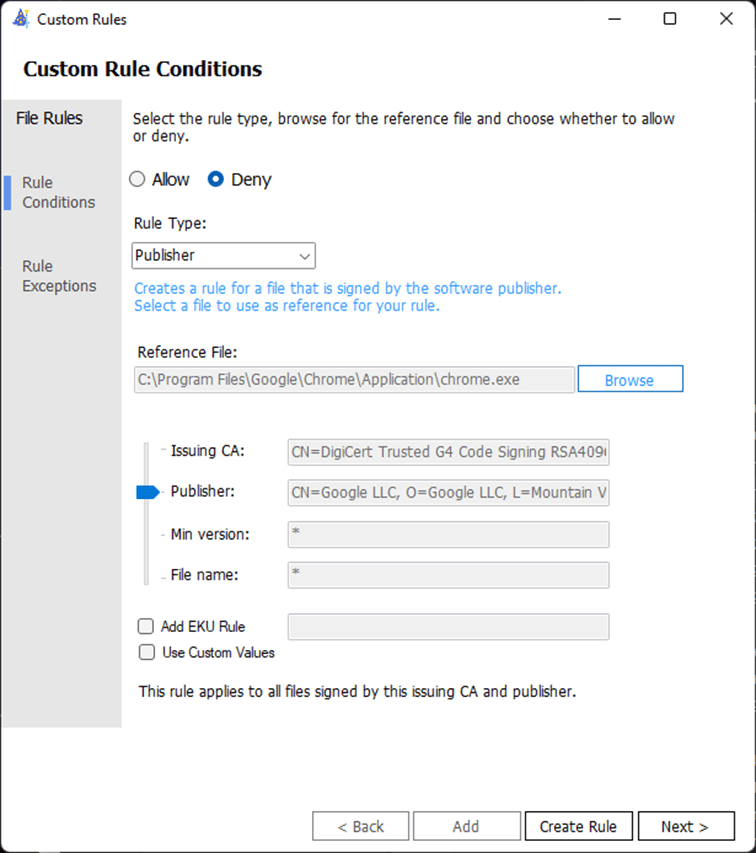
This is an example policy in enforcement mode that allows apps that are signed by trusted authorities, as well as apps that are know as trustworthy on the Intelligent Security Graph. In addition, known trustworthy signers or apps can be blocked with Deny rules.
Add a Custom Rule to Deny files signed by Google LLC publisher. Pairing Intelligent Security Graph with Deny Rules allows teams to support users who run a variety of globally know and reputable applications, while blocking specific applications or applications with specific publisher signatures.
WDAC in action

Advanced Hunting in Microsoft Defender for Endpoint
A WDAC policy will log audit and block events locally in Windows Event Viewer. This audit entry shows that an audit mode policy is applied and that chrome.exe would not run under enforcement mode.


Microsoft Defender for Endpoint is an enterprise endpoint security platform designed to help enterprise networks prevent, detect, investigate, and respond to advanced threats. Embedded in Windows 10 and 11, sensors collect and process behavioral signals from the operating system and send this sensor data to your private, isolated, cloud instance of Microsoft Defender for Endpoint.
Advanced hunting in Microsoft Defender for Endpoint allows admins to query WDAC events using an ActionType that starts with “AppControl”. Windows endpoints must be onboarded to Microsoft Defender for Endpoint.
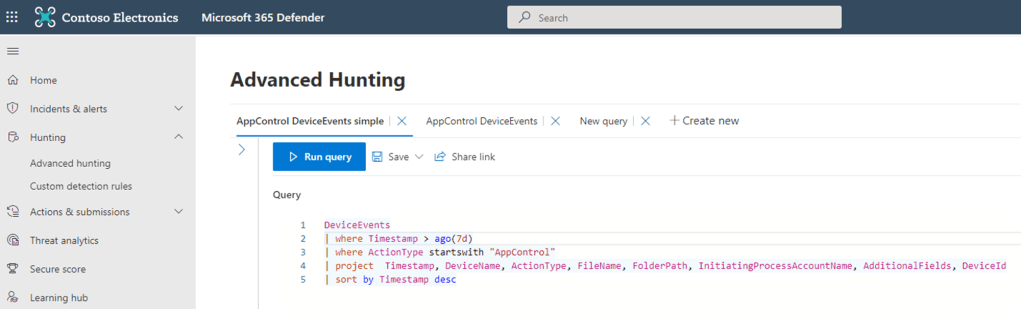
Assess the impact of deploying policies using Audit mode to see how the rules would influence systems in real world usage. This event is for ActionType AppControlCodeIntegrityPolicyAudited triggered by auditing a chrome.exe process execution.


Policies deployed in enforced mode may block executables or scripts that fail to meet any of the included allow rules. Legitimate new applications and updates or potentially unwanted or malicious software could be blocked.
This event is for ActionType AppControlCodeIntegrityPolicyBlocked triggered by blocking a chrome.exe process execution by policy in enforce mode (AuditDisabled) with Deny rule for apps signed by Google LLC publisher.

Microsoft Defender for Cloud Apps
Microsoft Defender for Cloud Apps is a CASB (Cloud Access Security Broker) solution that can block shadow IT and cut off access to cloud services while preparing to deploy application control policies. It is complimentary technology with different use cases, but part of a defense in depth strategy.
https://learn.microsoft.com/en-us/defender-cloud-apps/what-is-defender-for-cloud-apps


WDAC and Smart App Control
Starting in Windows 11 version 22H2, Smart App Control provides application control for consumers. Smart App Control is based on WDAC, allowing enterprise customers to create a policy that offers the same security and compatibility with the ability to customize it to run line-of-business (LOB) apps. Smart App Control is only available on clean installation of Windows 11 version 22H2 or later, and starts in evaluation mode. Smart App Control will automatically turn off for enterprise managed devices unless the user has turned it on first.
- WDAC and AppLocker Overview – Windows security | Microsoft Docs
- Balancing security and flexibility when implementing Windows Defender Application Control (WDAC) – https://aka.ms/TT/WDAC – Technical Takeoff on YouTube
- Windows Defender Application Control design guide (Windows) – Windows security | Microsoft Docs
- Plan for WDAC policy management (Windows) – Windows security | Microsoft Docs
- Policy creation for common WDAC usage scenarios (Windows) – Windows security | Microsoft Docs
- Windows Defender Application Control Wizard – Windows security | Microsoft Docs
- DEPLOYING WINDOWS 10 APPLICATION CONTROL POLICY – Microsoft Tech Community
- Microsoft WDAC Wizard (webapp-wdac-wizard.azurewebsites.net)
- GitHub – microsoft/AaronLocker: Robust and practical application control for Windows
- GitHub – mattifestation/WDACPolicies: A collection of Windows software baseline notes with corresponding Windows Defender Application Control (WDAC) policies
Tools like WDAC
 jcengelking.dev